iTunes is a great piece of software for anyone that likes music. Even if you don't have an iPod, it is very useful for organizing your music library and adding to your library by buying new songs at low prices. Of course, you need to have the appropriate account for the iTunes store. If you have an Apple account that you use with iTunes, then you will have to remember your account username and password. The username should just be your email address, but the password has to be created by you.
If you forgot your iTunes password, then you will need to go through a short and fairly painless procedure to get it back. In this article we'll show you two methods to recover lost or forgotten iTunes password.
Solution 1: Online iTunes Password ResetIf you forgot your iTunes password, then don't panic. Just launch the iTunes program, click on your username in the top right corner (or the sign in tab if it doesn't remember you) and then try to sign in. There's a button to the right of the password field that is labeled "Forgot Password?". Click on this button to bring up the next screen.
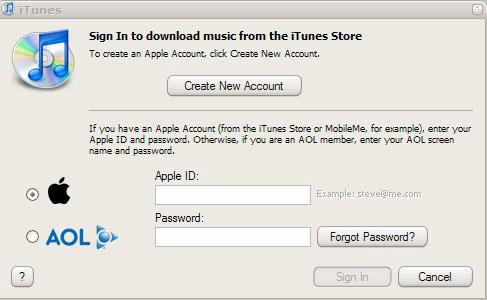
This one needs you to enter the username for the related account. As I said, this should just be the relevant email address. Type it in to pull up the next screen that's specific for your account. You have two options for recovery at this stage.
Option 1: If you still have access to the email account, then you can have it just reset the password. iTunes will send a new link to your email address. If you click on the link, it will just reset your password to something new. Use this new password to log into your iTunes account and then bring up your account information again. Change the password to something that you'll remember and then call it a day.
Option 2: If you don't have access to the email or don't want to go through the email reset process, you can have it ask you your secret question. It will first ask you to confirm a piece of account information, like your birthday, and then it will give you the secret question that you used when you signed up for the iTunes account. You just have to answer it to get your account back. Hopefully you can remember you secret question. If not, then you'll need to use the iTunes.
Solution 2: Recover iTunes Password with Password Recovery ToolNearly most Web browsers have a pretty nifty password manager, including Internet Explorer, Firefox, Chrome, Safari, Opera. When you log into iTune account from the iTunes Store, the Web browser offers to save your user name and password. The next time you visit that page, user name and password fields are auto completed for you. A real time-saver.
But have you ever forgotten your iTune password and need to recover the password saved in your browser? Once you have let your web browser remembers your password, it's quite easy to recover the password with Password Recovery Bundle. Let's take the example of Firefox browser.
1) Download and install
Password Recovery Bundle.
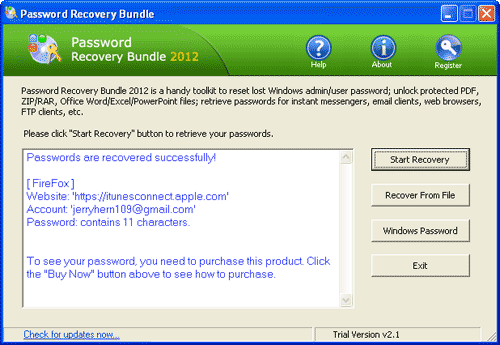
2) Run Password Recovery Bundle, then click the Start Recovery button. It will bring up a drop-down menu that shows all supported password types.
3) Select the Firefox Password option.
4) The program will instantly decrypt the passwords saved in Firefox's password manager, then display the logins and passwords to all your iTune accounts.
If neither of these works, then you will have to call iTunes support to try and find a human who can help you. If you have some other account details, then they might be able to help.
Hopefully these instructions should help anyone who forgot their iTunes password get their account back in order.