Microsoft recently revealed yet another new feature of Windows 8 in a new Building Windows 8 blog post. This time, we learn about signing in via a picture password. Microsoft claims that this method of signing in is secure and also a lot of fun to use.

"The experience of signing in to your PC with touch has traditionally been a cumbersome one. In a world with increasingly strict password requirements—with numbers, symbols, and capitalization—it can take upwards of 30 seconds to enter a long, complex password on a touch keyboard. We have a strong belief that your experience with Windows 8 should be both fast and fluid, and that starts when you sign in," Microsoft stated in an official Building Windows 8 blog post.
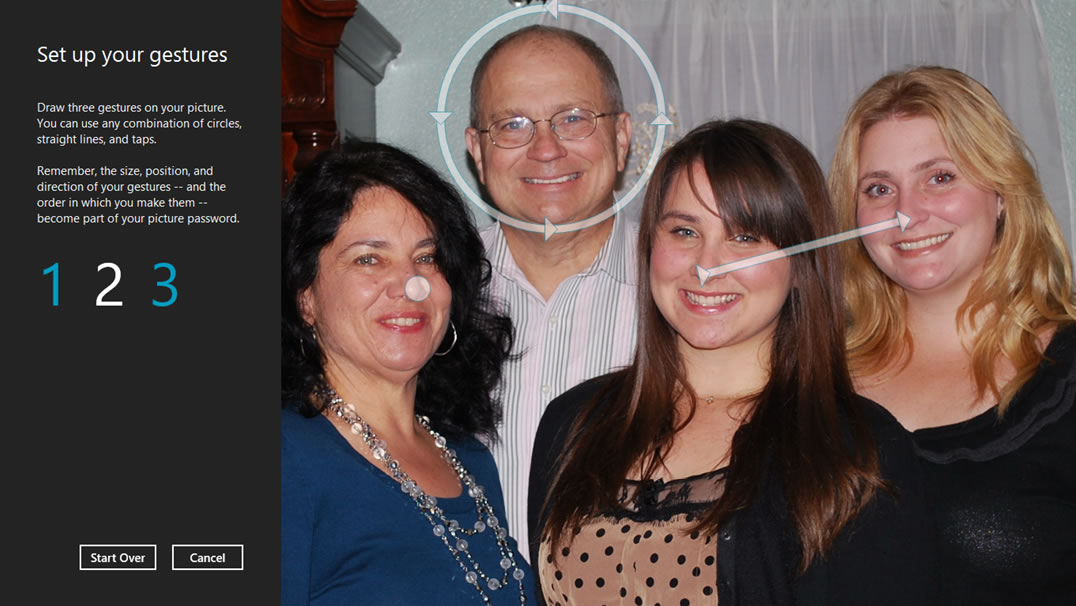
The new picture password feature is comprised of two parts. First, it utilizes a picture of your choice. Second, there are a set of gestures that you can draw upon it. Microsoft has made it to where you can upload a personal picture rather than use a canned set of Microsoft images, to personalize the experience. As Microsoft puts it, "it increases both the security and the memorability of the password." Microsoft relates this experience with one's lock screen on their smartphone.
"At its core, the picture password feature is designed to highlight the parts of an image that are important to you, and it requires a set of gestures that allow you to accomplish this quickly and confidently," Microsoft stated.
Microsoft also stated that this new picture password feature is optional and not a replacement to the traditional text password. "To be clear, picture password is provided as a login mechanism in addition to your text password, not as a replacement for it. You should be sure to have a good hint and use safeguarding mechanisms for your text password, which you can still always use to sign in," Microsoft emphasizes.
Forgot Windows 8 picture password? You can also find the way to reset
Windows 8 picture password when you forgot it.