Showing posts with label pdf password recovery. Show all posts

Friday, April 19, 2013

How to Crack and Decrypt PDF Password at Ease

Do you have a password protected PDF document that you can’t copy or edit its content? Can’t open a password protected PDF document? There are two types of password that exists when working with PDF files. The user password will encrypt the file and prevent it from opening whereas the owner password will prevent the user from printing, copying text and adding notes in the PDF document. So if you are looking to unlock your PDF file, you can use PDF Password Recovery program to crack and decrypt PDF password at ease.

How to Crack and Decrypt PDF Password at Ease?

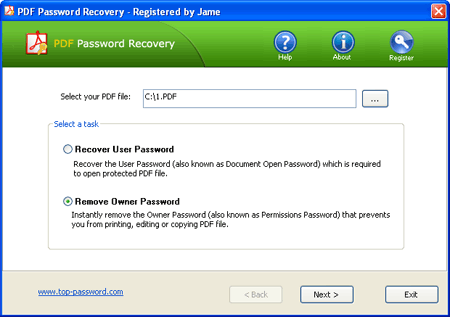
Simply download and install PDF Password Recovery application on your computer. After installing, start the application and you’ll see that there are two options on the main interface: Recover User Password and Remove Owner Password.


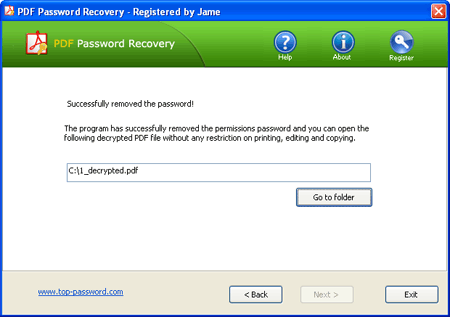
If the document’s original creator used a password to restrict copying or printing, please choose the Remove Owner Password option, the program will decrypt the PDF document and then generate a fresh copy of your original PDF file, but the new file is not protected with printing or editing restrictions. You can copy, print or edit any part of the PDF file at ease. This cracking procedure is instant, no matter how complex or strong your owner password is!

If the document is completely password-protected and won’t even allow you to open it, you need to choose the Recover User Password option. This program offers three cracking methods for you to recover the file open password: Dictionary attack, Mask attack and Brute-force attack. The recovery time could take a very long time, especially if the document’s original creator used a strong password.

Conclusion

The password protection imposed on PDF document can sometimes lock out owner yourself, PDF Password Recovery is a recommended option which allows you to crack and decrypt PDF password at ease.

Thursday, December 15, 2011

How to Remove Restrictions for Protected PDF Document

Some PDF files come with restrictions that limit our work. We can't print, copy or edit the content of an encrypted PDF file. And this could be the case even when you have the legal right to modify the document or copy from it. So in such situations, the best way out is to remove PDF password security and restrictions.

With PDF Password Recovery tool, you can instantly remove all PDF restrictions on printing, copying and editing. And this tutorial will show you how to remove PDF Permission Passwords (also known as Owner Password) and Get access to password-protected PDF files quickly and efficiently!

  1. Install PDF Password Recovery


    Click here to download the latest version of PDF Password Recovery package. Install it on your computer, then launch PDF Password Recovery program.


  2. Select PDF Document

    Click the ... button to select your protected PDF document you haven't permissions to print / copy / edit it.


  3. Remove PDF Restrictions


    Select the Remove Owner Password option, then click Next button. The program will remove the PDF restrictions immediately. You should now see a copy of your document that can be opened without requiring a password.